
Intertek Inform i2i
Intertek Inform i2i enable users to search and access Standards—voluntary documents that define specifications, procedures, and guidelines. CHS Library provides access to the complete collection of Australian Standards. This extensive resource, comprising over 6,000 documents, enables business units and individuals to enhance operational performance through compliance, quality assurance, and regulatory alignment.
Register
To access Intertek Inform i2i, users must register for a personal account:
- Visit Intertek Inform i2i
- Click on New Registration
- Complete the registration form using your @act.gov.au email address, then click Next
- Under the Company Details tab, select Canberra Health Services/Health and Community Services Directorate for both Company and Business Unit
- Click Complete Registration. A verification email will be sent to your registered email address
- Open the verification email and click the Confirm Sign-in Registration link.
Unlimited concurrent users can log in to Intertek Inform i2 and search for Standards. However, the Library's license limits the 'View Online' feature to 2 concurrent users. Please close 'View Online' when finished.
Find and access Standards
Learn how to find and access Standards using Intertek Inform i2i.
i2i Advantage Tutorial: Searching Standards (2:15 mins)
i2i Advantage Tutorial: Product Page (2:51 mins)
i2i Advantage Tutorial: View Online (3:11 mins)
Adobe Reader Settings
To view downloaded Standards using Adobe Reader, the 'global object security policy' will need to be disabled:
- Select Menu (top left), then select Preferences
- Under Categories, select JavaScript
- Tick Enable Acrobat JavaScript checkbox
- Untick Enable global object security policy checkbox
- Click OK.
i2i Advantage Tutorial: Digital Rights Management (DRM) (1:28 mins)
See Digital Rights Management Explained for more information about PDF protection used by Intertek Inform.
Downloading & Viewing PDFs
To download and view PDF Standards:
- Within the Standard record, click Download (yellow button, top right)
- When the Standard is ready for download, click Download document
- Open the Downloads folder on your PC (Find my downloads in Windows 10)
- Right click on the PDF and select Open with > Adobe Reader.
When opening a Standard in Adobe Reader, you will be prompted with the message "This document is trying to connect to doc.drm.saiglobal.com". Enable connection to view the Standard:
- Tick Remember this action for this site for all PDF documents checkbox (optional)
- Click Allow.
Intertek Inform Standards cannot be viewed as PDFs using a web browser (Microsoft Edge, Chrome, Safari, etc.). ACT Government PCs may default to opening PDFs in the Microsoft Edge browser. Make sure to open PDF Standards with Adobe Reader.
Licensing allows downloaded PDF Standards to be printed for individual use, providing the Standards are not stored, reproduced or shared.
International Standards can be accessed directly through Intertek Inform i2i. Before requesting a Standard check if an equivalent Australian Standard is available:
- Locate the required Standard
- Click the Standard's title to open product page
- Equivalent Australian Standards, if available, will display near the top right of the product page:
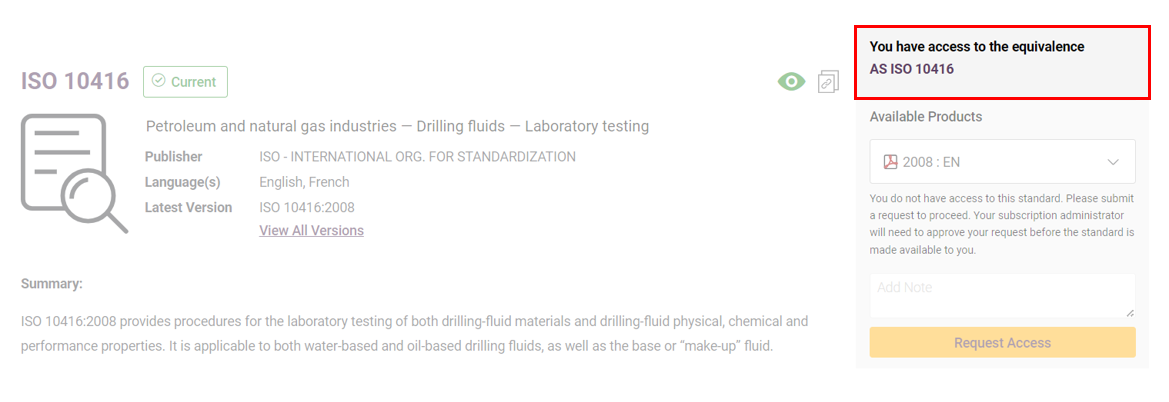
If there is no equivalent Australian Standard, click Request Access or Request Price:

Library staff will confirm the pricing of the Standard with you before purchasing.
Automatically track the Standards that matter to you, so you always have the latest information with no manual effort:
- Find the Standards you want to track
- Select a Standard and click Add to Watchlist
- Once added, you will receive updates whenever that Standard changes
- View all tracked Standards in Watchlist under the Account tab
- To stop tracking a Standard, go to My Watchlist and select Remove.
Further information
- See Online User Guide: login into Intertek Inform i2i and click User Guide at top right of the page
- See Intertek Inform - Frequently Asked Questions
- Contact the Library Service Desk.